
​ ​

Buy Parts | myDuncan

Duncan Aviation logo
MENU

Troubleshooting Honeywell FMS Waypoint Sequencing and Overshoot After NZ 6.1 Upgrade

June 2026

The Issue: Early Sequencing and Shallow Turns

Operators who have recently updated their Navigation Computers to NZ 6.1 (or later) software may notice unexpected flight behavior. These symptoms typically include the aircraft sequencing to the next waypoint as early as 20 miles out, shallow turns, and overshooting direct-to waypoints during departure. While these issues may appear to be internal hardware faults or software bugs, the solution is a straightforward on-wing configuration adjustment.
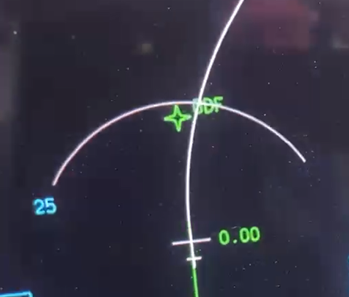
NZ 6.1 shallow turns, and overshooting direct-to waypoints during departure.png

According to Honeywell Service Information Letter (SIL) D201406000065, these issues occur because the BANK FACTOR setting may reset to 0 during the software upgrade.
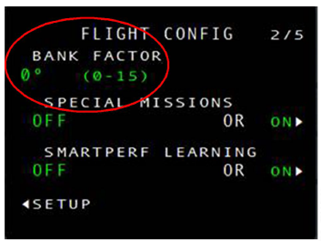
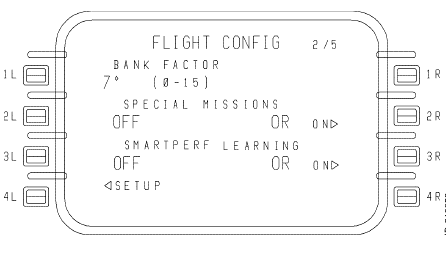
NZ 6.1 bank factor 1.png NZ 6.1 bank factor 2.png

To correct these issues, Honeywell recommends setting the BANK FACTOR to 7 or higher.  

Honeywell states, “The root cause is not known at this time. This service information letter will be updated when the root cause is found”. As of this writing, the SIL has not been updated.

Understanding BANK FACTOR Setting:

  • Definition: The BANK FACTOR is the highest bank angle (in degrees) to be used by the FMS unless a higher angle is required to maintain protected airspace.
  • Range: The setting can be any number from 0 to 15.
  • Dual Mode: The BANK FACTOR may be entered on the master CDU at any time (when operating in DUAL mode).
  • Changes: If the FMS configuration changes from SINGLE, INDEPENDENT, or INITIATED XFER to DUAL mode, the master BANK FACTOR overwrites the slave BANK FACTOR value.
  • Other modes: In modes other than DUAL, BANK FACTOR must be set on both FMSes and requires a flight cycle to save the setting.

Step-by-Step Video Guide: How to Update Your Bank Factor

On the CDU, access the FLIGHT CONFIG Page 2 by using the following key strokes:

  • NAV > NEXT > MAINTENANCE > NEXT > SETUP > FLIGHT (CONFIG) > NEXT
    • You should now be on the FLIGHT CONFIG page 2 as shown in the previous images in this article.
  • Enter the desired BANK FACTOR in the scratchpad and then press the line select button 1L to enter it next to BANK FACTOR.

Expert Avionics Support and Troubleshooting

For further information or assistance, the Avionics Technical Representatives at Duncan Aviation are always available and happy to assist.