
 When a pilot reports that the NAV isn’t working, first determine which navigation source was in use when the problem occurred. Was the aircraft navigating with GPS, or with a conventional VHF navigation system, such as VOR or ILS?
Knowing the navigation source helps narrow down where to look for the problem.
When did the problem occur?
When the autopilot is in NAV ARM, it hasn't started following the navigation course yet. Instead, it essentially flies the heading the pilot selected while calculating when to turn to intercept the navigation course.
The autopilot considers factors such as how far the aircraft is from the course, the angle at which it is approaching the course, and how quickly it is getting closer.
If the autopilot is armed to capture a navigation course but flies right through it, investigate whether the FCS (flight control system) received the information it needed to make the capture.
Navigation systems provide the flight control system with signals that essentially say whether the navigation information is valid and available to use. These signals can be different depending on the equipment involved.
For example, the navigation display may recognize the signal as valid, while the flight control system does not. A problem with the signal’s voltage level, wiring, or scaling can cause the autopilot to capture too early, too late, or not at all.
In this case, the autopilot recognizes and captures the course, but doesn't stay centered on it. The problem may be within the FCS’s ability to calculate and maintain the aircraft’s position relative to the navigation course.
Wiring can also play a role. NAV signals can be susceptible to electrical interference, particularly if wiring is not properly shielded. That interference can prevent the FCS from accurately sensing the NAV signal.
If the squawk occurs only when VOR navigation is selected, the potential cause is likely limited to the VOR system and the equipment connecting it to the FCS. Investigate the NAV receiver, the HSI course resolver, and the wiring between them.
If the autopilot works normally with other navigation sources but has problems during an ILS (instrument landing system) approach, look at the signals associated with the localizer and glideslope.
The localizer tells the aircraft whether it is left or right of the runway centerline, while the glideslope provides vertical guidance to help keep the aircraft on the proper descent path.
As with other navigation signals, the equipment has to communicate correctly with the FCS. Some systems use different electrical signal levels to indicate when the localizer is valid, so a mismatch can prevent the autopilot from recognizing the signal correctly.
Other inputs can also affect ILS performance. On many FMSes, the response to localizer and glideslope signals changes as the aircraft approaches the runway. This explains why ILS guidance becomes more sensitive near the runway.
Some older systems use marker receiver information to make similar adjustments. Because many airports no longer have marker beacons, these systems may not perform as well as they originally did.
With roll steer, the GPS provides steering instructions directly to the flight control system. The GPS essentially tells the autopilot which direction to turn, and the flight control system follows those instructions.
If a problem occurs with this type of installation, the GPS receiver or the wiring between the GPS and FCS would be a logical place to start. The Flight Director computer could also be involved, although it would generally be a less likely cause.
Some older aircraft were originally designed for autopilots that understood VOR-style navigation signals, but they were later upgraded with GPS. Instead of replacing the entire autopilot, the GPS was configured to make the autopilot think it was receiving a traditional VOR signal.
On these installations, the GPS and VHF navigation systems typically share the FCS through external switching equipment. If the system doesn't function properly, you can first verify that the VOR system is working correctly. If it is, next check the switching equipment and wiring that determine which navigation source is sent to the FCS.
Not every NAV-related autopilot problem originates with the navigation receiver or the autopilot itself.
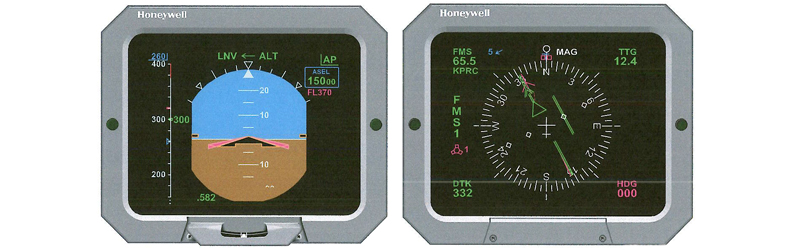
Many aircraft equipped with EFIS (Electronic Flight Instrument Systems) use digital data to move navigation information throughout the aircraft. The EFIS processor may then convert that information into a format the flight control system can use.
That means the navigation system and autopilot may both appear to be working normally, while the problem is actually occurring somewhere in-between.
When an autopilot won't follow a navigation course, the first question isn't necessarily “What's wrong with the autopilot?”
It's “What navigation source was the aircraft using, and is the right information making its way from that source to the FCS?”
Following that path can help you pinpoint the problem and get the system back to doing what it is supposed to do: keeping the aircraft on course.
November 2026
November 2026
October 2026
October 2026
September 2026