
When experiencing issues with aircraft components and instruments, hard failures are often the easiest to resolve. Because the problem is constant, it is easily duplicated on the test bench and quickly repaired. Conversely, intermittent problems can be the most frustrating puzzles in aviation maintenance. They are rarely obvious when sitting statically on a bench, often depending on the physical orientation of the indicator’s internal workings, cockpit vibrations, temperature fluctuations, or other elusive outside factors.
Often, Duncan Aviation Component Bench technicians work solely on the description of the squawk provided by the pilot, the line tech, or a third-party maintenance facility. Squawk descriptions can range from meticulously detailed logs to notoriously brief descriptions like INOP.
When a technician receives a unit with a vague description, they are forced to play detective. Without knowing the specific phase of flight, the exact configuration of the avionics stack, or the environmental conditions when the failure occurred, bench testing becomes a time-consuming guessing game.
Fortunately, you are already carrying one of the most powerful troubleshooting tools known to man: a smartphone with a high-definition camera.
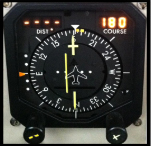 |
This photo shows a possible squawk of the CDI deflected to the left while on course. This still-shot is helpful along with additional squawk information. If this was intermittent, a video of this in flight showing the other instruments or turning the course knob would give even more information to narrow down the cause. |
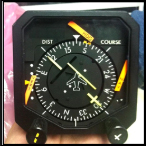 |
This would appear to be a complete power loss with no digits lit and all flags in view. If this situation were intermittent, an in-flight video of this may show multiple functions intermittently affected by turbulence in a certain phase of flight, possibly after it had heated up by the end of a multi-hour flight. |
Providing pictures or, ideally, video of the unit showing the actual squawk as it occurs is invaluable to the technician on the bench. Visual evidence removes the guesswork by clarifying:
Even if we cannot replicate the intermittent failure on the bench, seeing it in action provides critical clues. It allows us to bypass generic diagnostic trees and target specific internal components, such as worn gear trains, loose ribbon cables, or failing cold-cathode backlights—that are known to cause those exact visual symptoms.
Video: This video is a good example of a Rad Alt (Radio Altimeter) squawk of Rad Alt intermittently jumpy in flight. It clearly shows two different indicators showing the same issue, while also showing the current altitude and airspeed. This information lets us be sure that it is an upstream failure pointing to the receiver/transmitter itself or antenna/cabling, and not a single flight deck instrument issue. This short 8-second video gives a ton of valuable information to help with troubleshooting.
To get the most out of this approach, keep a few best practices in mind when documenting an issue:
This video is a good example of a Rad Alt (Radio Altimeter) squawk of Rad Alt intermittently jumpy in flight. The video clearly shows two different indicators showing the same issue, while also showing the current altitude and airspeed. This information lets us be sure that it is an upstream failure pointing to the receiver/transmitter itself or antenna/cabling, and not a single flight deck instrument issue. This short 8 second video gives a ton of valuable information to help with troubleshooting.
In the aviation world, downtime is expensive, and unresolved maintenance issues are a safety hazard. Providing a picture or video of a squawk achieves what a written or verbal description simply cannot. It bridges the communication gap between the cockpit and the maintenance bench, ensuring the right problem gets fixed right the first time, saving money, reducing frustration, and getting the aircraft back in the air where it belongs.
For questions about aircraft component troubleshooting or repair, contact the Duncan Aviation Component Tech Rep team at LNK.ComponentTechReps@DuncanAviation.com.
November 2026
October 2026
October 2026
September 2026
June 2026